People
Using
Project URL
Year
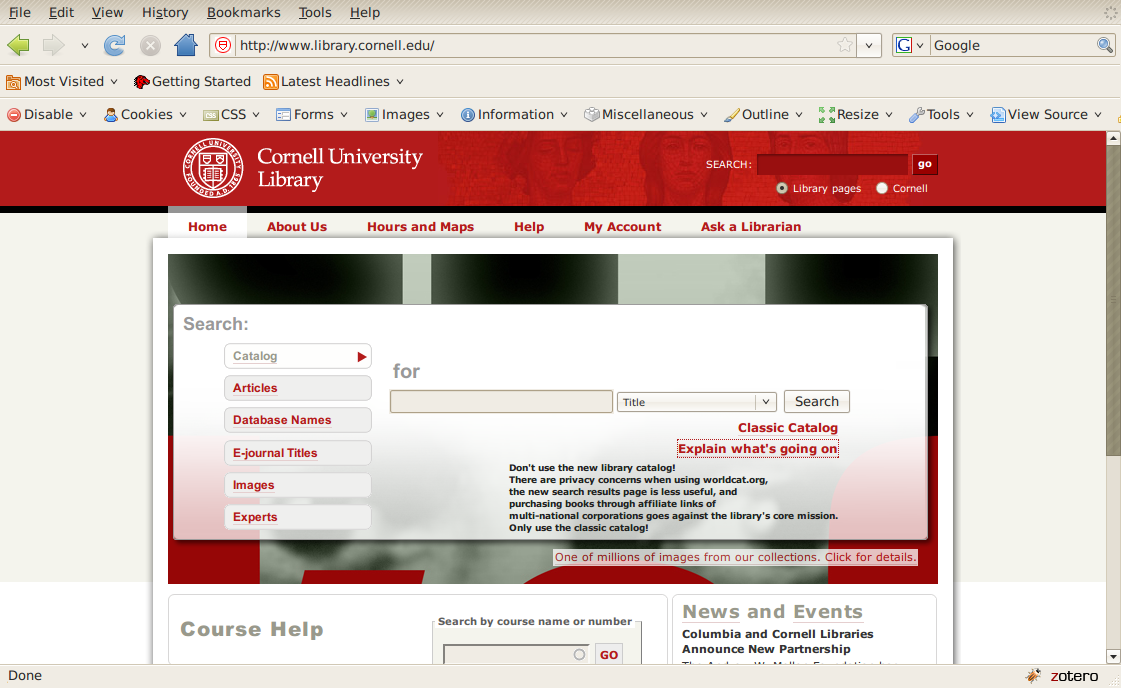
Because it is unclear what the privacy policies of worldcat.org are, especially with regards to data retention and level of compliance under the Patriot act, it is all the more heinous that the Cornell Libraries has instituted a new form that defaults to sending all searches through worldcat.org. These searches thus leave the confines of the Cornell campus network and are sent in plaintext over the web, open to interception by anyone. All the more, the worldcat.org results are less useful (requiring clicks on each item to see its location and status, rather than on the search results themselves under the "classic" catalog), use unnecessary AJAX to load the book's status, are nearly 7 times as large as the "classic" results, and link the library to commercial entities (not local ones) for the "ability" to purchase books. All these aspects are at cross purposes to the mission of the library and the search form on the library website, namely whether or not the book is located at the library and if so, where it is. Thus this script, also available in a standalone version, that replaces the "new" worldcat.org interface with the older "classic" interface, thus negating the need to click multiple times in order to protect your privacy.
// @name Replace Library Form
// @namespace http://zeitkunst.org
// @description Replace the worldcat form with the older one
// @include http://library.cornell.edu
// @include http://*.library.cornell.edu
// @version 0.1
// ==/UserScript==
var ReplaceLibraryForm = {
version : '0.1',
init : function() {
// nothing here right now
replaceLibraryForm();
},
replaceLibraryForm : function() {
divToReplace = document.getElementById("quick-search");
divToReplace.innerHTML = "<form name=\"querybox\"
action=\"http://library.cornell.edu/script/opac-redirect.php\" method=\"get\"
autocomplete=\"OFF\">
<span class=searchHead><a href=\"http://catalog.library.cornell.edu/\">Library Catalog</a></span>&nbsp;&nbsp; <span class=searchForm>
<input size=10 maxlength=\"100\" name=\"Search_Arg\" id=searchInput>
<select name=\"Search_Code\" size=\"1\">
<option selected value=\"TALL\">Title</option>
<option value=\"NAME_\">Author</option>
<option value=\"SUBJ_\">Subject</option>
<option value=\"FT*\">Keyword</option>
</select>
<input type=\"image\" border=\"0\" value=\"Go\" name=\"Go22\" src=\"img/go.gif\" align=absbottom alt=\"[Search]\"></span></form>";
}
}
ReplaceLibraryForm.init()

Images
Add new comment